
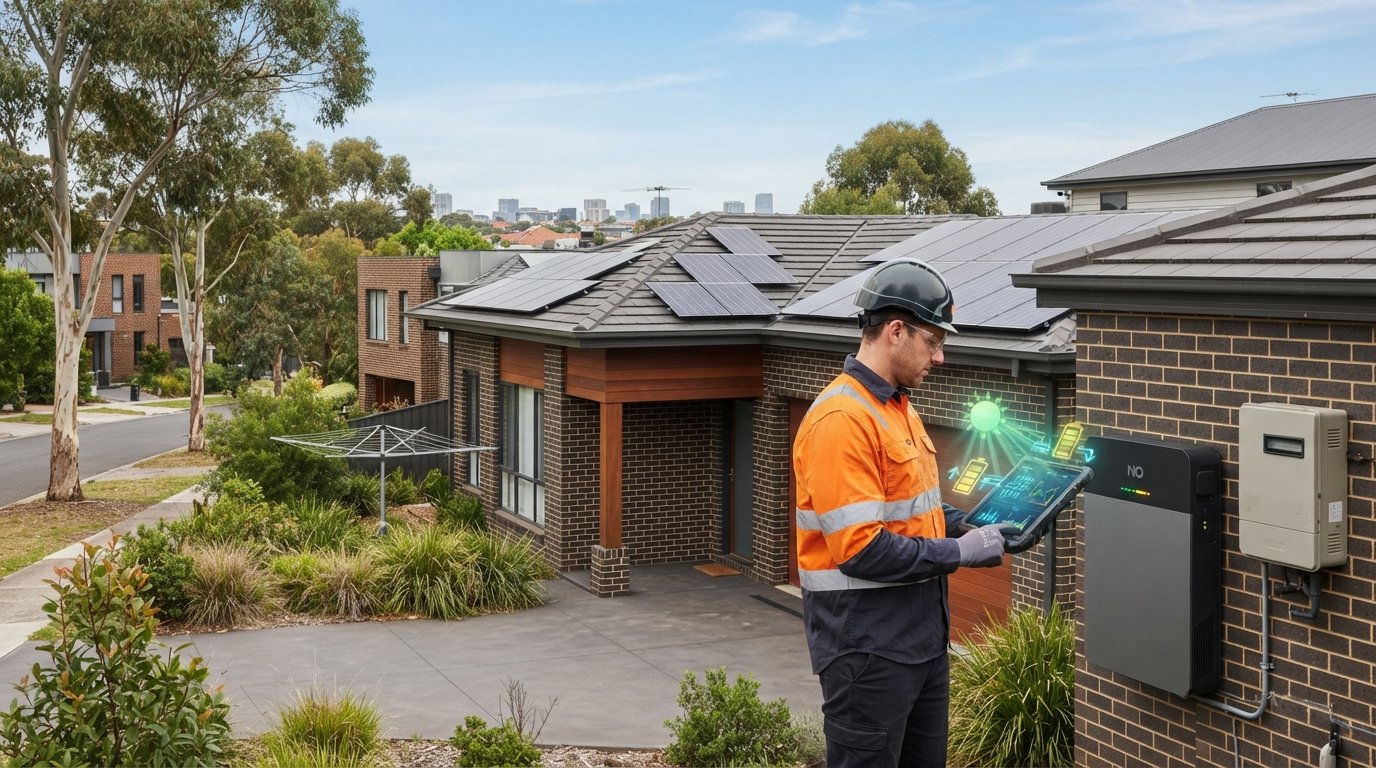
Your solar system may already include the essentials for monitoring your solar system’s performance. Most rooftop solar and battery systems provide monitoring through an inverter display, website or app. This can show solar production, often in kilowatt-hours, while monitoring that measures generation and household use can also reveal grid imports and exports. A separate system isn’t always necessary; it depends on what you want to see.
Solar monitoring can make your energy use easier to understand, but it helps to know what the data does and doesn’t show. Production figures alone won’t tell you how much solar power your home uses or how much electricity it draws from the grid.
This guide explains how displays and apps track production, household consumption, battery activity and grid flows, and what to look for when reviewing your system. You’ll also learn when inverter monitoring may be enough and when a more detailed view could help you spot changes in performance.
Key Takeaways
- Most rooftop solar and battery systems include basic monitoring through a display, website or app; a separate system may not be necessary.
- Production data shows how much electricity your panels generate, while more detailed monitoring can reveal household use and energy moving to or from the grid.
- Fault alerts and comparisons with expected generation can help flag changes in performance, but data alone may not explain the cause.
- Check production trends over time, not just a single day, and use your system’s monitoring tools to spot unusual changes.
- Choose the level of monitoring that matches what you want to understand, from current output to battery activity and household energy flows.
Should You Get A Monitoring System With Your Solar Panels?
Most rooftop solar and battery systems include basic monitoring through an inverter display, website or app. Whether you need more depends on whether you want production figures alone or a clearer view of faults, household use and grid electricity.
Fault alerts and performance issues
Fault alerts flag system errors or unusual production, while performance analytics compare actual generation with expected output. This can help you spot a sudden drop and investigate possible shading, dirty panels or damage, but the data can’t confirm the cause.
Some monitoring systems can alert you within a couple of days if the system goes offline. Take an electrical fault code or safety warning seriously: monitoring is a signal to act, not a safety inspection. Stay off the roof, record the alert and contact your installer if output falls without an obvious explanation.
Monitoring requirements and performance warranties
Monitoring describes how a system’s output is displayed and tracked; a performance warranty is a separate commitment about panel output over time. Solar panels come with a minimum performance guarantee of 25 years, but that does not mean monitoring hardware or fault alerts are legally required for every Australian installation.
Use monitoring data to understand changes, then review the warranty terms for the covered equipment and conditions. Ask your installer to explain expected daily generation across the seasons and how the battery is configured. That baseline makes it easier to recognise a meaningful decline without mistaking ordinary weather variation for a fault.
Monitoring device and energy meter costs
The cost of an energy meter varies with the device, installation requirements and the information it measures, such as household consumption or grid imports.
Existing inverters often provide basic production monitoring, so a separate device may not be needed if you only want generation figures. More detailed monitoring can show household energy flows. Before comparing extra hardware with your current display or app, decide which information you need.
Checking panel, inverter and battery operation
Compare the inverter’s daily production with your system’s usual pattern, then review the battery’s charge information and operating mode. Monitoring can show production by hour, day and month, but expected generation differs between Australian states and depends on location, system size, orientation, weather and season.
Cloud can reduce output without stopping generation; shading and accumulated dirt can also affect production. If readings remain unusually low, or the inverter displays a fault code, contact your installer. Solar Victoria recommends a professional system check at least every two years. Never climb onto the roof to inspect panels yourself.
Real-time solar energy production and consumption tracking
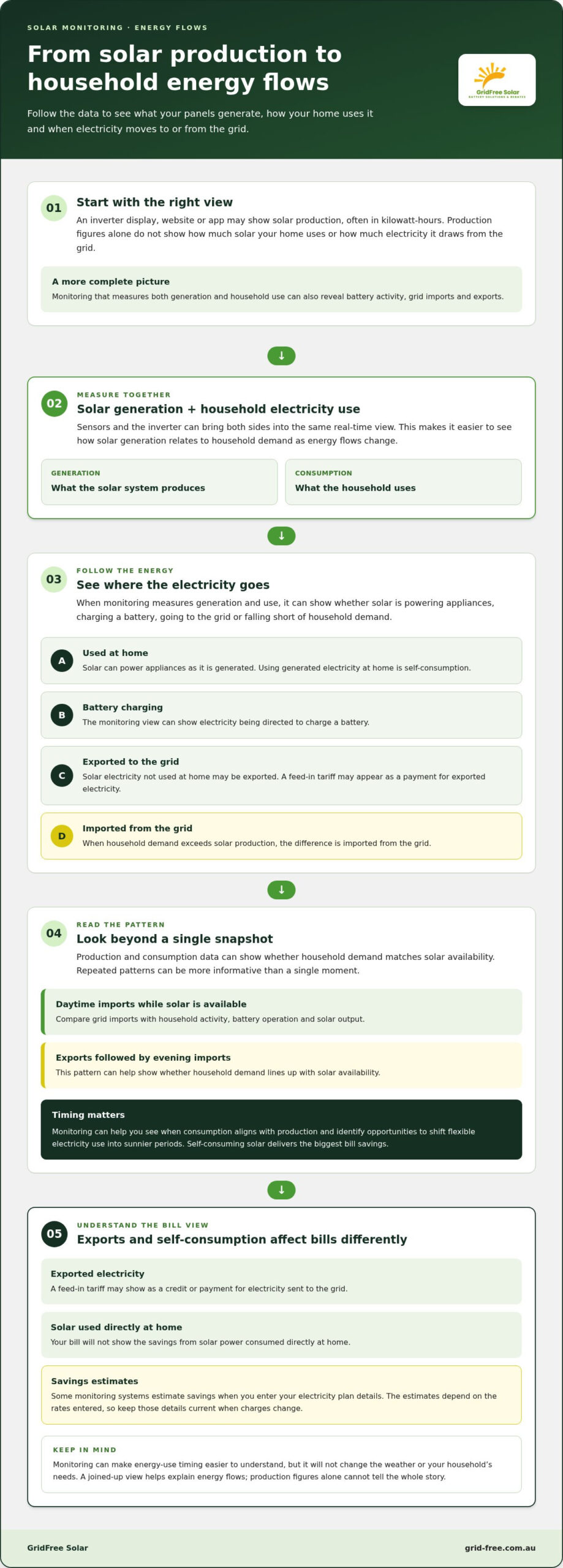
Real-time monitoring brings solar generation and household electricity use into the same view. Sensors and the inverter measure energy flows, helping you see whether solar is powering appliances, charging a battery, going to the grid or falling short of household demand. This joined-up picture turns production data into practical insight about how your home uses electricity.
Monitoring can help you understand how solar generation relates to household consumption. When household demand exceeds solar production, the difference is imported. Monitoring that measures both sides can show these flows as they change, rather than displaying production alone. For example, you can see whether running an appliance during sunny hours uses available solar or coincides with grid imports.
Self-consuming solar means using electricity as it is generated, which delivers the biggest bill savings. Monitoring can show when your consumption aligns with production and help you spot opportunities to shift flexible electricity use into sunnier periods. It won’t change the weather or your household’s needs, but it can make energy-use timing easier to understand.
Exports and self-consumption affect bills differently. A feed-in tariff may appear as a payment for exported electricity, but your bill won’t show the savings from solar power used directly at home. Some monitoring systems estimate savings when you enter your electricity plan details. These estimates depend on the rates entered, so keep the details current when charges change.
Tariff analytics can help explain why grid costs remain high despite strong solar production. Compare periods of high imports with household activity, battery operation and solar output. If your monitoring system supports plan details, review how electricity prices and feed-in tariff credits shape its savings estimate. The useful question isn’t only how much power the panels make, but when your home buys electricity.
Production and consumption data also give you a practical view of energy use. Look for repeated patterns, such as grid imports during the day while solar generation is available, or exports followed by evening imports. These patterns can show whether household demand matches solar availability. Alerts and historical analytics make changes easier to spot, while a single snapshot may not explain a recurring trend.
Tracking solar energy use can also show how much generated electricity is consumed at home rather than exported. That gives a clearer view of how your system supports household demand, without treating every exported kilowatt-hour as an environmental or financial benefit. To connect energy flows with system planning, explore solar system planning as a related next step.
Inverter and battery display panels
An inverter display is a simple monitoring point on many Australian solar systems. It can show operating status, generated power, battery charge and fault codes.
Choose the view that answers your question: a local display for a quick status check or an app for more detail.
Integrated and third-party monitoring options
Integrated monitoring uses the inverter or battery’s own display, website or app, while third-party devices add another way to measure system information. Most rooftop solar and battery systems include a built-in option, so start with the equipment already installed.
A basic inverter panel often shows current-day generation and operating mode, but not how energy was used over time. A connected app may provide reports and alerts, while a separate device can add household-use data if it’s compatible with the system. Check when its display updates before relying on a single reading.
String inverter and microinverter monitoring
A string inverter’s monitoring can show total system generation and, in some cases, output from individual panel strings. This can help narrow a production change to a section of the array, rather than identify a specific panel.
Microinverters can report generation from individual panels, making an underperforming panel easier to pinpoint in the data. The level of detail depends on the installed equipment and monitoring interface, so use the readings to locate patterns, not assume a cause.
Review operating information as well as generation. A battery display may show its charge information and current operating mode, helping explain why it’s charging, discharging or holding energy. For example, a low battery reading alongside little solar generation gives a different picture from a full battery during strong panel output.
Connectivity affects whether remote monitoring can receive data. Depending on the inverter or monitoring device, the connection may use built-in 4G or 5G, a LAN cable, Wi-Fi or Bluetooth connected to broadband. If an app stops updating, first distinguish an internet or communications gap from a solar fault; the local inverter display may still show system status.
Some batteries participating in a virtual power plant have an app that reports market participation and financial outcomes. That view serves a different purpose from an inverter screen showing current-day generation. Use the display that matches your question: system status, panel output, battery operation or participation information.
Keep your display or app access details handy, then compare the same readings over time. A current-day panel reading can confirm what the inverter reports now, while historical data is needed to review longer-term patterns.
Household electricity use and grid imports
A solar inverter can show generation, but household electricity use requires a broader view. A separate monitoring device can measure home or business consumption, grid electricity purchases and solar exports. These readings show where energy goes: solar may power appliances, excess generation may flow to the grid, and extra demand may require imports. Read all three figures together to understand your home’s energy balance.
Compare monitoring data with your electricity bill, which most Australian households receive every three months. Check whether grid imports rose, solar exports changed or household consumption increased during the same billing period. For example, a change in appliance use can lift imports even if solar production looks similar. Compare equivalent periods where possible, as seasonal generation and household routines can differ.
A bill shows charges and credits, but may not reveal when energy was used. Monitoring can show when electricity use exceeds solar generation and your home draws from the grid. That distinction matters because using solar electricity as it is generated delivers the biggest bill savings. Use the data to identify flexible tasks that could run during stronger production, rather than assuming all daytime demand is already solar-powered.
Exports and self-consumption affect bills differently. A feed-in tariff may appear as a credit for electricity sent to the grid, while savings from solar used at home won’t appear as a separate line item. Some monitoring systems estimate savings when you enter your electricity plan details. Treat the estimate as a guide based on those rates, and update the plan information when your tariff changes.
Comparing tariffs means looking beyond the feed-in rate. Review the plan’s import charges, fixed costs and export credit alongside your monitoring data. The best fit depends on when your home imports electricity, how much it exports and when household demand occurs. A home may have a couple of dozen electricity retail tariffs to choose from, so use actual usage patterns rather than choosing on one advertised rate.
Use the device’s consumption and import records to see whether a plan fits your routine. If readings show regular imports during periods of low solar generation, compare how the tariff treats those purchases. If exports are substantial, weigh the feed-in credit against import costs and other plan charges. Monitoring won’t choose a plan for you, but it gives you a relevant basis for comparison.
To get more value from solar, look for repeatable timing opportunities in the data. If generation is strong while grid imports continue, review which electricity use can move into that period. If imports rise despite similar household routines, compare bill dates, tariffs and monitoring readings before drawing conclusions. These checks help distinguish a plan mismatch from a change in consumption or solar supply.
Monitoring solar system performance
Monitoring your solar system’s performance is more useful when you treat the dashboard as a record, not a verdict. Production figures by the hour, day and month let you compare patterns over time. A single reading shows one moment; a longer record can reveal whether output is changing.
Build a baseline from a few months of production data before judging a change. Compare similar periods and consider weather, season, shading and household energy consumption. A cloudy day, for example, can produce a lower total without signalling a fault. A persistent drop across comparable conditions deserves closer attention.
Cloud-based platforms can store readings, provide live updates and offer remote access to analytics. Monitoring systems generally send data to the internet every few seconds. Good systems can assess whether generation is performing as expected to within a few per cent. Treat this as a useful comparison, not a guarantee that every change has been diagnosed.
A weekly review helps you notice irregularities without reacting to every fluctuation. Compare the same measures each time:
- Review production against the system’s past daily and monthly records.
- Look for a sustained change, rather than a dip on one day.
- Compare battery charging and storage with solar generation.
- Consider whether changed household routines explain different energy flows.
Tracking these measures can help separate a generation change from a shift in demand. If production stays similar but grid imports rise, household use or appliance timing may have changed. If generation falls across comparable conditions, the pattern provides useful context for investigating the system.
To monitor your solar system’s performance against expectations, use the generation guidance for your installation and location. Ask how expected output varies by season and how the battery is configured to operate. That context makes advanced analytics more meaningful than a generic comparison, especially when assessing whether solar and storage support your household’s energy use.
If app data suggests an issue with panels, an inverter or a battery, stay off the roof and contact your solar supplier. A graph can show when output changed, but it can’t inspect equipment or identify the physical cause. Solar Victoria recommends a professional system check at least every two years.
Keep the app connected, review it weekly and compare trends across a few months. A consistent approach to monitoring your solar system’s performance can make later planning decisions more informed. If you’re considering a system shaped around your household’s energy use, explore solar system options.
GridFree Solar: Battery Upgrade & Replacement
GridFree Solar provides Battery Upgrade & Replacement when monitoring data shows your existing battery isn’t meeting your household’s storage needs. Review generation, battery charge patterns and evening grid imports together. Recurring imports after solar production ends can help you assess whether storage capacity suits your energy use.
Monitoring can inform your decision, but it won’t determine the right battery setup on its own. GridFree Solar also provides solar and battery installation, Residential Solar Panel Installation and Commercial Solar Solutions. These services are relevant if you’re planning a new system or considering a battery alongside solar.
Use your production and consumption history to explain what you want a system to support, such as storing solar energy for later household use. For battery upgrade or replacement options suited to your solar setup, contact GridFree Solar.
Make your next energy decision with confidence
Treat monitoring data as a practical record of how your household’s energy needs change. As routines, appliances and priorities shift, reviewing that record can help you decide whether your setup still suits your plans. Monitoring your solar system’s performance is valuable not only for spotting changes, but also for using what you observe to guide your next decision.
If your observations have you considering a change, focus on the outcome you want: a different approach to energy storage, a new solar setup or a system designed around another property. A clear sense of your priorities makes the next conversation more useful.
GridFree Solar can help you explore the relevant solar or battery options for your situation. Contact GridFree Solar to discuss your next step, and move forward with a plan that fits your energy goals.
Frequently Asked Questions
How Does It Work?
Solar monitoring combines readings from the inverter and, where installed, energy sensors or a meter. The inverter records electricity produced, while a meter can measure energy moving between the home and the grid. Data may appear in an app, website or display. If the app shows generation but no household-use readings, for example, it may not provide a complete picture of where your solar electricity goes.
How often should you check your solar system and consumption?
Check the system dashboard at least once a week, using each review to notice changes rather than judge a single reading. For household consumption, compare monitoring data with each electricity bill, which most Australian homes receive every three months. Note changes such as a new appliance or different daily routine. This context can explain a shift in imports without mistaking higher use for a solar fault.
How do I monitor a home solar system’s performance in Australia?
Use the inverter’s display, website or app for production information, then add a compatible meter if you need household consumption and grid-flow readings. In Melbourne, account for the system’s location and seasonal conditions when interpreting data. If the app stops updating, check whether the internet connection has dropped before treating missing readings as a generation failure. Historical records can help distinguish a communications gap from a lasting change.
What solar inverter monitoring apps and portals are available in Australia?
The available app or portal depends on the inverter and battery equipment installed at your property. Many systems present information through an inverter-linked app, website or display, while a separate monitoring device may add household energy readings. Data connections can use Wi-Fi, LAN, Bluetooth connected to broadband, or built-in 4G or 5G. Use the interface connected to your equipment, since a third-party app may not display every system function.
How do I compare solar system output with expected generation for my location and system size?
Compare your readings with the generation estimate for your system, using the same period and units. Ask how expected output changes through the year, as Melbourne’s seasonal sunlight differs from other Australian locations. Check several comparable days rather than comparing one cloudy day with a sunny estimate. Also account for system size, panel orientation and shading, which affect how closely actual production follows the expected pattern.
What solar performance alerts or warning signs indicate a fault?
Treat an inverter fault code, an offline-system alert or a sustained production drop as a reason to investigate. First note the time, message and recent output pattern, then compare these with the system’s usual records. A short dip during cloudy weather may have a different explanation from repeated low generation under similar conditions. Stay off the roof and contact your solar supplier if the data points to a panel, inverter or battery issue.
How do I monitor solar self-consumption, grid imports and exports in Australia?
Use a monitoring setup that measures household electricity use as well as solar generation. It can distinguish solar power used at home from surplus exported to the grid and electricity imported when demand exceeds generation. Monitoring can help show how household electricity use relates to solar generation, self-consumption, and energy imported from or exported to the grid. This breakdown is useful in Australia because feed-in tariff credits show exported electricity, not the value of solar power consumed at home.